GEO INSIGHT

How to Apply JSON-LD to a Website — Actual Code Connecting Organization, Website, and Service via @id

JSON-LD is code that declares the organizational, service, and content relationships of a webpage in a format that search systems can read. This article discloses the operational code of the 7 schemas distributed on the SUMMITFEED homepage exactly as is. It records not only the application method but also what was wrong in the initial version and how it was fixed.

Quick Conclusion

Before application, the homepage rendered the screen UI, but there was no JSON-LD declaring entities based on app/page.tsx.

Currently, the Korean and English homepages and article pages each output a single @graph within a single script. There are 7 top-level nodes, and 0 unreferenced orphan nodes.

FAQs are created by mapping the screen rendering array exactly. 9 Korean items, 8 English items, and 5 Article items match exactly in the screen and schema.

The biggest change is not the number of types. It is the removal of orphan nodes from the first version and the work of identifying five instances in the English version where issues fixed in the Korean version remained.


What Is JSON-LD, and Why Start with the Homepage?

JSON-LD (JavaScript Object Notation for Linked Data) is a format that inserts structured data into HTML using <script type="application/ld+json"> blocks. It uses the Schema.org vocabulary. There are three types of structured data formats, but in practice, they are effectively consolidated into a single type.

FormatLocationMaintenance
JSON-LDSeparated by <script> blocksIndependent from screen markup
MicrodataDirectly in HTML tag attributesBroke when markup is modified
RDFaDirectly in HTML tag attributesIdentical

JSON-LD is separated from screen markup. Data does not break even if the design is changed. Google also recommends this format.

The reason for applying it starting from the homepage is that it serves as a reference point. The Organization entity is the root that the entire site references. If you declare an Organization on the homepage and assign an @id, subpages only need to point to that @id instead of repeatedly writing company information. Conversely, if you modify the subpages first, the same company will be split into multiple entities.

The background of the GEO perspective is summarized separately in the What is GEO Guide.


Before Implementation: What Was Missing from the Website?
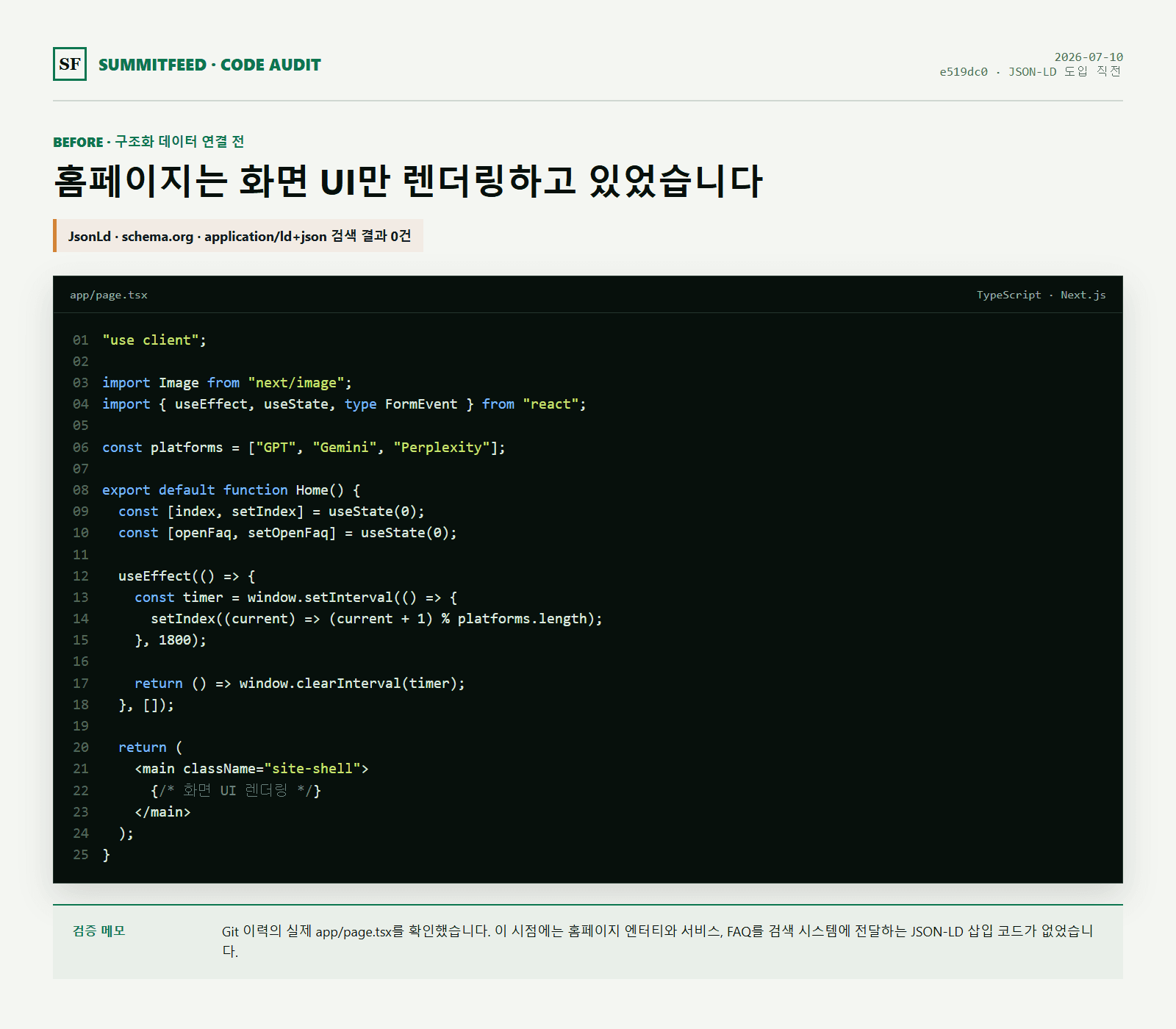
The baseline before the change was commit e519dc0 on 2026-07-10, just before the introduction of JSON-LD. At that time, app/page.tsx started with use client and directly managed screen states and interactions. The search results for the strings JsonLd, schema.org, and application/ld+json in this file were 0.

I will clarify the scope of verification. The results above are based on a single file, app/page.tsx. In Next.js App Router, JSON-LD is injected into layout.tsx and shared components as well. To use this as a page-level conclusion, you need to broaden the search scope.

Do not interpret this state as uncrawlable. The HTML body is collected. The problem is not collection, but interpretation.

Regardless of how many times a company name appears on a page, there was no basis to determine whether it was the official organizational name or a word within the body text. The same applies to whether a number is a representative number, or whether the service description refers to this company or another. Humans understand through context. Machines need a declaration to understand.

Commit hashes are an internal reproduction standard. Since the repository is private, it cannot be directly viewed from the outside. If public verification is required, you can compare it with the rendered HTML preserved at that point in time.


Capture of SUMMITFEED homepage app page code before JSON-LD application
Excerpt of actual Git code before changes. The search results for JsonLd, schema.org, and application/ld+json were 0 items.

How the Organization Schema Was Built
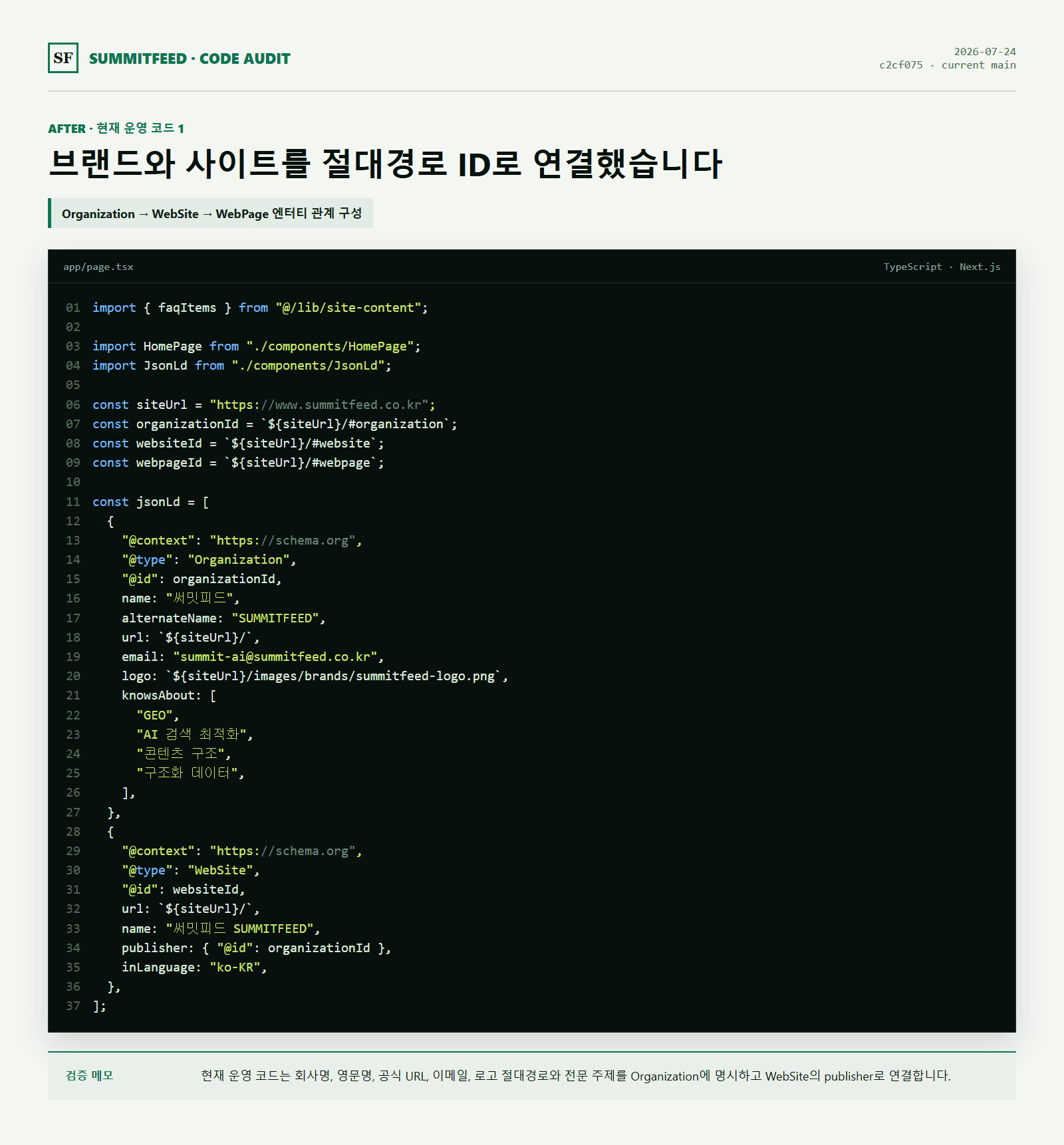
This is the first node created. All other nodes reference this.

json
{ 
"@type": "Organization", 
"@id": "https://www.summitfeed.co.kr/#organization", 
"name": "SUMMITFEED", 
"alternateName": ["SUMMITFEED", "SUMMITFEED"], 
"url": "https://www.summitfeed.co.kr/", 
"logo": { 
"@type": "ImageObject", 
"@id": "https://www.summitfeed.co.kr/#logo", 
"url": "https://www.summitfeed.co.kr/images/brands/summitfeed-logo.png", 
"width": 1481, 
"height": 470, 
"caption": "SUMMITFEED" 
},
"identifier": {

"@type": "PropertyValue",

"name": "Business Registration Number",

"value": "884-73-00630"

},

"taxID": "884-73-00630",

"sameAs": ["https://summitfeed.tistory.com/"],

"knowsAbout": [

"Generative Engine Optimization",

"AI Search Optimization",

"Structured Data",

"Schema.org"

]

}

There is a reason for every attribute.

`@id` — This is the unique address of this organization. It uses the format Homepage URL + #organization. Instead of other nodes repeating the company information, they point to this value.

`alternateName` — Enter both Korean and English. Whether searched for "SUMMITFEED" or "SUMMITFEED", it leads to the same entity.

`logo` — A string URL is valid, but using ImageObject passes the dimensions and caption. Google requires the logo to be at least 112×112px.

`identifier` and `taxID` — The business registration number is entered in two forms. identifier is labeled with a human-readable label like name: "Business Registration Number", while taxID is a Schema.org standard attribute, ensuring machine readability. It is worth including both as they are unique values ​​that distinguish entities with the same name.

`sameAs` — Links to an externally public profile. Without this attribute, all organization information remains as self-declarations.

There is a point here where it is easy to make a mistake. You must only enter organizational accounts.** If you include the representative's personal blog in the Organization field, you are essentially claiming "this organization = personal profile." When we first generated the list, we almost overlooked the fact that Brunch and Medium are personal accounts.

`knowsAbout` — Enter the professional topic in both Korean and English. Topics are detected even in English queries.


Current SUMMITFEED Organization and WebSite JSON-LD code capture
Code introduced as of 2026 7 24. The relationship between Organization information and WebSite publisher is connected via absolute path ID.

How to Connect WebSite and WebPage Nodes with @id

Sites and pages are placed on top of the Organization.

json
{ 
"@type": "WebSite", 
"@id": "https://www.summitfeed.co.kr/#website", 
"url": "https://www.summitfeed.co.kr/", 
"publisher": { "@id": "https://www.summitfeed.co.kr/#organization" }, 
"inLanguage": "ko-KR"
}
json
{ 
"@type": "WebPage", 
"@id": "https://www.summitfeed.co.kr/#webpage", 
"url": "https://www.summitfeed.co.kr/", 
"isPartOf": { "@id": "https://www.summitfeed.co.kr/#website" }, 
"about": { "@id": "https://www.summitfeed.co.kr/#organization" },

"breadcrumb": { "@id": "https://www.summitfeed.co.kr/#breadcrumb" },

"mainEntity": { "@id": "https://www.summitfeed.co.kr/#faq" },

"primaryImageOfPage": { "@id": "https://www.summitfeed.co.kr/#logo" },

"dateModified": "2026-08-17",

"inLanguage": "ko-KR"

}

Relationships are read like this.

schema-relationship.svg
ServiceproviderOrganization#organizationPersonworksForWebSitepublisherWebPageisPartOf · aboutBreadcrumbListbreadcrumbFAQPagemainEntity
Arrows show the direction of @id references. Green nodes were already connected; gold nodes were added or connected in this revision.

URL notation must be standardized character by character. https://example.com and https://example.com/ look the same to the human eye, but they are different values ​​when comparing strings. We have even matched the trailing slashes of self-referencing URLs 5 — canonical, Organization.url, WebSite.url, WebPage.url, BreadcrumbList.item —.

I would also like to point out dateModified. If you store this value as a string, it will inevitably conflict with the update date displayed on the screen. Group it into a single constant so that the schema and footer see the same value. This will be discussed again later.


When to Use Service and FAQPage

json

{

"@type": "Service",

"@id": "https://www.summitfeed.co.kr/#service-geo",

"name": "GEO Analysis and Execution",

"serviceType": "Generative Engine Optimization",

"provider": { "@id": "https://www.summitfeed.co.kr/#organization" },

"areaServed": { "@type": "Country", "name": "South Korea" }

}

In serviceType, enter the official English name. For areaServed, the Country object is clearer than a string like "KR".

FAQPage has only one rule. Create this from the screen rendering array.

tsx

{

"@type": "FAQPage",

"@id": "https://www.summitfeed.co.kr/#faq",

isPartOf: { "@id": "https://www.summitfeed.co.kr/#webpage" },

mainEntity: faqItems.map((item) => ({

"@type": "Question",

name: item.question,

acceptedAnswer: { "@type": "Answer", text: item.answer },

})),
}

faqItems is the very array that the screen FAQ section renders. The key is not to match the text, but to create a structure that cannot be misaligned.

Initially, we also wrote the questions and answers separately in the schema. However, while modifying the screen text, only the schema was updated, and three places became misaligned. One of them was a situation where a question existed only in the schema but was not on the screen at all. After switching to a map method for arrays, this type of error became structurally impossible.

FAQ Rich Results were discontinued in 2026 5

Google removed FAQ Rich Results from search results as of 7 in 2026 5. In 6, the FAQ search impression type, Rich Results reports, and Rich Results test support in Search Console were removed, and Search Console API support will be removed in 8.

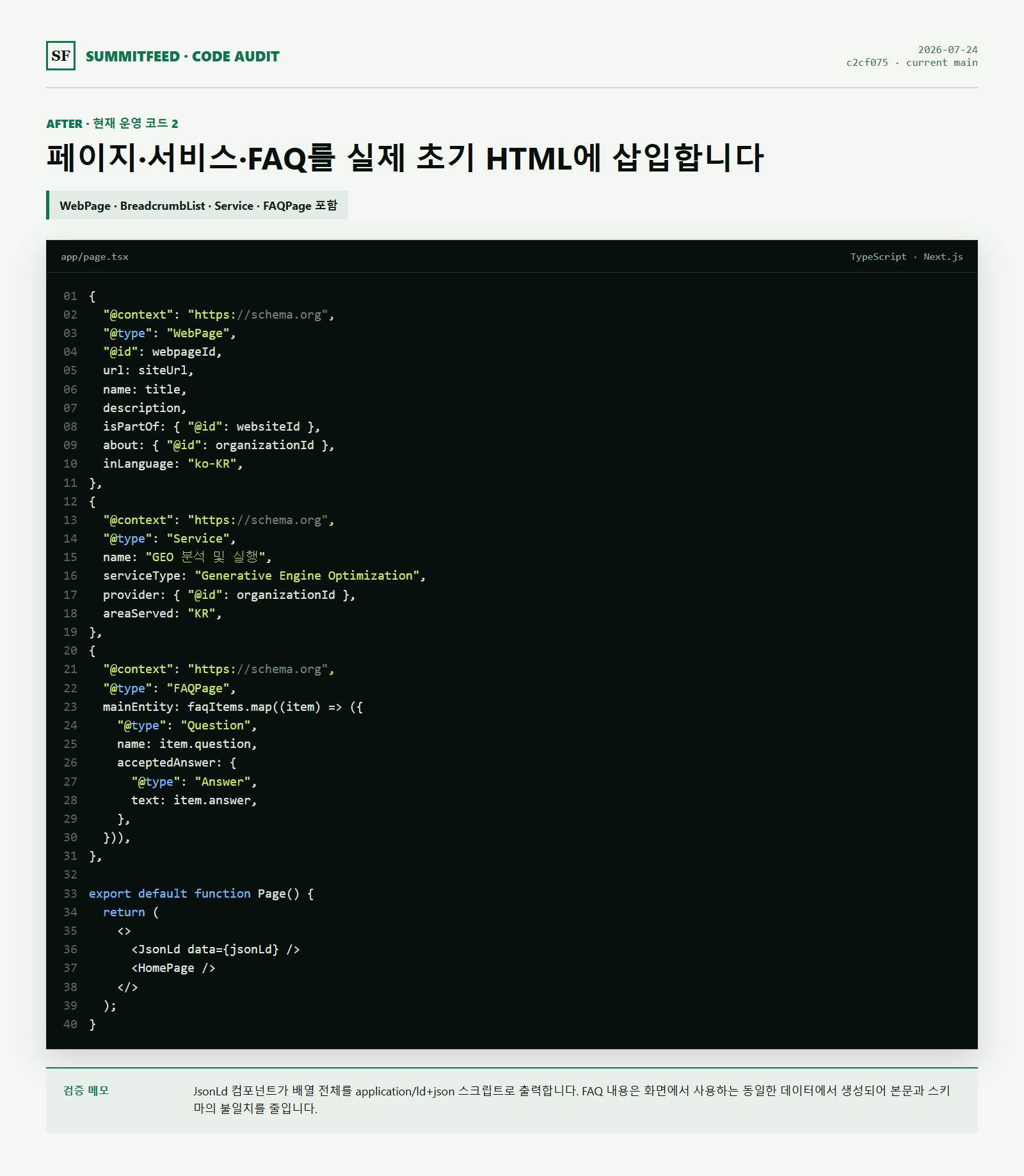
However, the reason FAQPage is maintained is not because of Rich Results. FAQPage is still a valid Schema.org type and serves to group on-screen Q&A and machine-readable data from the same source. If you included it solely for the sake of Rich Results impressions, now is the time to reconsider.


Current SUMMITFEED WebPage Service FAQPage and JsonLd insertion code capture
Code introduced as of 2026 7 24. Subsequently reinforced on 2026 8 17 with a single @graph and @id connections for each node.

Why the Author Uses a Separate Person Node

The Organization node alone does not leave a record of "who wrote it." We created Person as a separate node and connected it via worksFor.

json
{

"@type": "Person",

"@id": "https://www.summitfeed.co.kr/#founder",

"name": "Lee Seung-chan",

"jobTitle": "CEO",

"url": "https://www.summitfeed.co.kr/about",

"worksFor": { "@id": "https://www.summitfeed.co.kr/#organization" },

"sameAs": [

"https://brunch.co.kr/@609024f8b3744e2",

"https://medium.com/@dltmdcks623100"

]

}

On the Organization side, this is referred to as founder It points to the node. It is bidirectional.

Dividing it this way prevents personal and organizational channels from mixing. Brunch and Medium are representative personal accounts, so they go into Person.sameAs, while Tistory is an organizational account, so it goes into Organization.sameAs.

There is a method to change the personal account to the company name, but I do not recommend it. In terms of "who wrote it," a person's name is a stronger signal than a company name. There is nothing to be gained by deleting the author entity.


The First Version's Problem: Three Orphaned Nodes

This is the story of what actually happened.

The first version was a method of listing 6 types in an array. @context was written repeatedly for each object, and @id was attached to only three of them.

schema-relationship.svg
ServiceproviderOrganization#organizationPersonworksForWebSitepublisherWebPageisPartOf · aboutBreadcrumbListbreadcrumbFAQPagemainEntity
Arrows show the direction of @id references. Green nodes were already connected; gold nodes were added or connected in this revision.

Without @id, it cannot be referenced. Service pointed to Organization as provider, but conversely, Service could not be pointed to anywhere. FAQPage was completely floating as it had no relationship attributes.

It is not a syntax error. It also passes the Rich Result test. However, it was not in a state where it could be said to "convey the relationship between Brand, Site, Page, Service, and FAQ."

The fix consisted of three steps.

  1. Convert the array to a single @context + @graph
  1. Assign @id to the three nodes
  1. References from WebPage to breadcrumb and mainEntity, and from Organization to Service to makesOffer
json

{

"@context": "https://schema.org",

"@graph": [ /* 7 nodes */ ]

}

By using @graph, you only need to write @context once, and references between nodes are visible at a glance. As a result, the number of types increased from 6 to 7, but the actual change is that orphan nodes increased from 3 to 0.


Five Common Failure Points on Multilingual Sites

This section is the most practical part of this article.

After fixing the Korean page and checking the English page, the same problem remained five times. Every time I fixed one, I thought, "I already fixed this earlier."

#ProblemKoreanEnglish
1FAQ Screen/Schema Single SourceModified FirstVerification Result: Normal
2BreadcrumbList @idModified FirstNone → Added
3FAQPage @id and isPartOfModified FirstNone → Added
4Footer Date and dateModified MatchModified FirstMismatch → Connect Constants
5Single @graph StructureFirst, EditArray → Transform

4 was particularly noticeable. The Korean footer was 2026-08-17, while the English footer was July 24, 2026. The same information on the same site was spread out by more than 3 weeks depending on the language.

The cause is simple. It is because I made the corrections while looking at the Korean screen. The English pages exist in a separate file with separate text, but I did not open that page when correcting the Korean version.

What to Separate and What to Share by Language

This is the most confusing point in multilingual JSON-LDs. The criterion is "is there only one entity?"

NodeProcessingReason
OrganizationShare @idThere is only one company
PersonShared with @idThere is only one Person
ServiceShared with @idThere is only one Service
WebSiteSeparated by language/ and /en are different site sections
WebPageSeparated by languageThere are two pages
BreadcrumbListSeparated by languageThe paths and labels are different
FAQPageSeparated by languageThe number of items is different first

Nodes sharing @id must have the same set of attributes. If the same #service-geo exists but areaServed is present only in Korean, it is effectively describing the same entity twice differently.

One more thing here. If the value of a shared node is in Korean, it will appear in Korean on the English page as well. This is the case with Person's name. Since there is only one entity, the value should not be changed; instead, it is more appropriate to add the English notation using alternateName.


How to Verify JSON-LD in the Initial HTML

There is a difference between code existing and what the search system reads.

If you inject a JSON-LD inside useEffect, it enters the browser DOM but is not in the initial HTML returned by the server. Checking with `document.querySelectorAll` in the browser console does not prove this either. This is because it views the DOM after hydration is complete.

Verification is done using curl.

bash

curl -s https://www.summitfeed.co.kr/ | grep -o '"@type":"[^"]*"' | sort | uniq -c

This is the current result of running the Korean homepage.

schema-relationship.svg
ServiceproviderOrganization#organizationPersonworksForWebSitepublisherWebPageisPartOf · aboutBreadcrumbListbreadcrumbFAQPagemainEntity
Arrows show the direction of @id references. Green nodes were already connected; gold nodes were added or connected in this revision.

There are 1 script blocks and 7 top-level nodes. The fact that Question and Answer each have 9 instances means they exactly match the 9 items in the FAQ on the screen. ContactPoint, ImageObject, PropertyValue, and Country are child objects contained within the parent nodes.

This is the result of verifying the three pages in the same way.

PageTop-level NodeFAQ Screen / Schema
Korean Home79 / 9
English Home78 / 8
This Report Page75 / 5

The validation tools use two together. Rich Result Test checks for Google Rich Result qualifications, while Schema.org Validator checks the JSON-LD syntax itself. The latter catches syntax errors when types not supported by Google are used. Running only one will miss them.


Seven Common JSON-LD Mistakes

1. Adding content that is not visible on the screen only to the schema

Google’s general guidelines for structured data explicitly prohibit the markup of content that is not visible to the reader. This provision remains valid even now that the FAQ Rich results have ended, and violations are subject to manual action. Adding star ratings or prices that are not visible on the screen falls into the same category.

2. Repeating the same information across schemas without @id

If you write the company name, URL, and logo in Organization, Website, and Article respectively, the same company is split into multiple entities. Please assign an @id and refer to them.

3. Relative URL paths

If you write it like /images/logo.png, the interpretation varies depending on the page location. url, @id, and logo must all be https absolute paths.

4. JSON-LD injection within useEffect

Client Values ​​generated after execution are not present in the initial HTML. Please configure them to be output in the server rendering path.

5. Embedding Dates and URLs as Strings

If you write dateModified as a string, it will inevitably be out of sync with the screen update date. The same applies to @id.

We belatedly discovered that @id was embedded as a string in five places in the English file. The value itself was correct, but if the path changes, only that location remains. It takes 5 minutes to enclose it as a constant.

6. Cases where array types are missed when checking with grep

The pattern "@type":"[^"]*" cannot capture arrays like "@type":["Article","TechArticle"]. It does not match because the part after the colon is [. If you think a node is missing and insert it again, it results in a duplicate.

Please check the array type separately.

bash

curl -s <URL> | grep -o '"@type":\[[^]]*\]'

7. Fixing Only One Language on a Multilingual Site

The entire previous section is about this. If you have fixed the Korean version, please check the English version on the same day. If the files are separated by language, one side will always remain at the end.


Seven Schema Types Currently in Production

This is a table for overview purposes. Descriptions of each item are in the previous section.

Schema.org TypeKey AttributesRelationships
Organizationname alternateName url logo identifier taxID knowsAbout sameAsOther nodes refer to #organization
Personname jobTitle url knowsAbout sameAsworksFor → Organization
WebSiteurl name inLanguagepublisher → Organization
WebPageurl name description dateModifiedisPartOf → WebSite, about → Organization
BreadcrumbListitemListElement position itemWebPage's breadcrumbServiceserviceType areaServed urlprovider → Organization, Organization's makesOffer
FAQPagemainEntity acceptedAnswerWebPage's mainEntity, screen array map

The goal is not to increase the number of types. The standard is to display only the information currently on the screen and to eliminate duplicate declarations by cross-referencing with @id.


Pre-Release Checklist

  • Do the company name, English name, official URL, email, and logo match across the entire site?
  • Are the self-referencing URLs identical strings, including the trailing slash and including the canonical?
  • Do the schema's services and FAQs exist within the actual screen content?
  • Do all nodes have @id, and are there no orphan nodes that are not referenced?
  • Do the dates and @id reference constants, or are they not embedded as strings?
  • If it is a multilingual site, have the above items been verified for each language?
  • After deployment, does application/ld+json appear in the initial HTML using curl?
  • Did it pass both the Rich Result test and the Schema.org Validator?

The third-to-last item is the part we missed the most.

A broader range of checks is summarized in AI Search Visibility Website Audit 25 Checklist.


Frequently asked questions

Where should JSON-LD be placed?

It can be in <head> or <body>. What is more important than the location is whether it is included in the initial HTML returned by the server. If it is injected after client execution, it will not be read regardless of the location.

Is it better to have more schemas?

No. We only use information that is actually on the page and can be explained. In our case, eliminating orphan nodes was a much bigger change than increasing the number of types. Relationships, accuracy of values, and consistency with the screen content are more important than the number of types.

For multilingual sites, should @id be separated by language?

Nodes with a single entity are shared, while page-level nodes are separated. Organization, Person, and Service are shared, while WebSite, WebPage, BreadcrumbList, and FAQPage are separated by language. Shared nodes must also have the same set of attributes.

Is the FAQ schema no longer necessary?

Google Search FAQ Rich Results were discontinued as of 2026 5 7, and Search Console reporting items are being phased out. However, FAQPage remains a valid type, and the value of the on-screen Q&A content remains unchanged. If the goal was rich results, a review is required; if the goal was consistency between the screen and structured data, you should keep it.

I passed the rich result test, but it doesn't appear in search results.

Passing the test only verifies syntax and qualifications. Actual display is a separate matter, and there are many types that do not provide rich results in the first place. Organization, Website, and Service are examples of this. These types do not create changes to the search screen.

Is @id absolutely necessary?

It is valid even without it. However, nodes without @id cannot be referenced. Please add it if there are two or more nodes on a single page.

Will including JSON-LD lead to citation in AI search?

JSON-LD is a condition for citation, not the cause. Without structure, there is insufficient basis for interpretation, and having structure does not automatically lead to citation. Actual mentions and citations depend on question relevance, content quality, collectibility, source reliability, timing, and platform. We [operate] by establishing the structure first and then repeatedly measuring citations per question (/geo-partner).

Did search engines not read the homepage at all before the application?

They did read it. However, reading is different from understanding. The HTML body and links were collected, but there was no declaration to determine which organization's official information that information was.

Conclusion

Conclusion

The actual change in the SUMMITFEED homepage is the number that the schemas increased from 0 to 7 No. The point is that official organizations, authors, websites, homepages, services, and FAQs are linked via @id within a single @graph and read from the initial HTML.

The first implementation contained 3 orphan nodes. Self-referencing URLs were split into two types, and the FAQ text was misaligned with the screen. Even after fixing all the issues in the Korean version, five of them remained on the English page.

Inserting code and establishing the structure are different tasks. The former takes a day, while the latter requires a verification process.

JSON-LD is not a device that generates search rankings or AI citations. It is code that declares the subject and relationships of a page for machines to read, helping search systems understand the page. On top of this, accurate content, consistent brand information, collectible technical structure, external sources, and repeated measurements per question must be present.

SUMMITFEED does not stop at applying the code; it also checks the consistency between screen information and the schema, collection paths, and changes in exposure per question. If you are comparing criteria for selecting an agency, please also refer to 2026 GEO Agency Comparison.

Request Free GEO Diagnosis


Editorial note
2026-08-18 — Types 6 → 7 (Person added), added orphan node fixing process, created a new multilingual site section, terminated FAQ rich results (2026-05-07), included operational code text, created a new 7 category for common mistakes, reflected actual measurement verification results

This article was written by directly comparing the actual operational code and Git history of the SUMMITFEED website. Search results and Generative AI responses vary depending on the platform, question, time, and user conditions.